


Fashion supplier management software keeps the companies you buy from connected to the products they help make. A supplier might be a garment factory, fabric mill, trim manufacturer or packaging company. Keeping a contact list is the starting point; the useful part is knowing what each supplier is making, what you have asked for and what still needs a response.
Take a hoodie made by one factory with fabric from a separate mill. The mill supplies the cloth, while the factory cuts and sews the garment. Those companies need different information and may have different contacts for sampling, pricing and production.
Build a supplier record your team can use
Store the company name, address, website, main contacts and what the supplier makes. Include useful commercial details such as minimum order quantities, lead times and the currencies you work in. A minimum order quantity is the smallest order the supplier will accept; lead time is the time it needs to complete the agreed work.
Lifecycle’s vendor directory holds factories, mills and other suppliers, with contact details, capabilities and certificates. A vendor record describes the company. A vendor user is a person with a login. You can keep a supplier in the directory without inviting anyone into your workspace.
Connect suppliers to products and materials
Record which factory makes each product and which supplier provides each material. These are not always the same company. For the hoodie, the product’s main vendor may be the sewing factory, while the fabric in its bill of materials comes from the mill. The bill of materials, or BOM, is the list of fabrics, trims and other items needed for the garment.
In Lifecycle, material library items can carry their own manufacturer. The product and its vendor tech packs identify the factories doing the garment work. This helps your team find the right contact when a question concerns the fabric rather than the finished hoodie.
Share clear garment instructions
A tech pack explains how to make the garment: drawings, measurements, materials and construction details. Share the relevant pack with the factory instead of sending disconnected files with no clear indication of which version applies. The tech-pack software guide explains each section.
Lifecycle offers a sharing link and PIN for a factory to view a pack without an account. You can also share with selected vendor contacts. When suppliers need to work with requests and responses in the portal, invite the appropriate people. Check the document as the recipient would see it before using it for an actual order.

Keep sample requests and price quotes attached to the work
A sample request asks the factory to make a physical garment for review. A quote request asks what it will cost to supply the work. Both need a clear product, quantity or size, due date and recipient. Avoid an email saying “please quote this” without confirming which materials and quantities the price should cover.
Lifecycle lets you request a sample and notify the vendor’s contacts from the sample round. Its costing workflow can request a quote from selected vendors by a specified date, with the response available as a costing scenario for review. Our sample-management guide covers fit feedback and the next sample request.
Control what each supplier can see
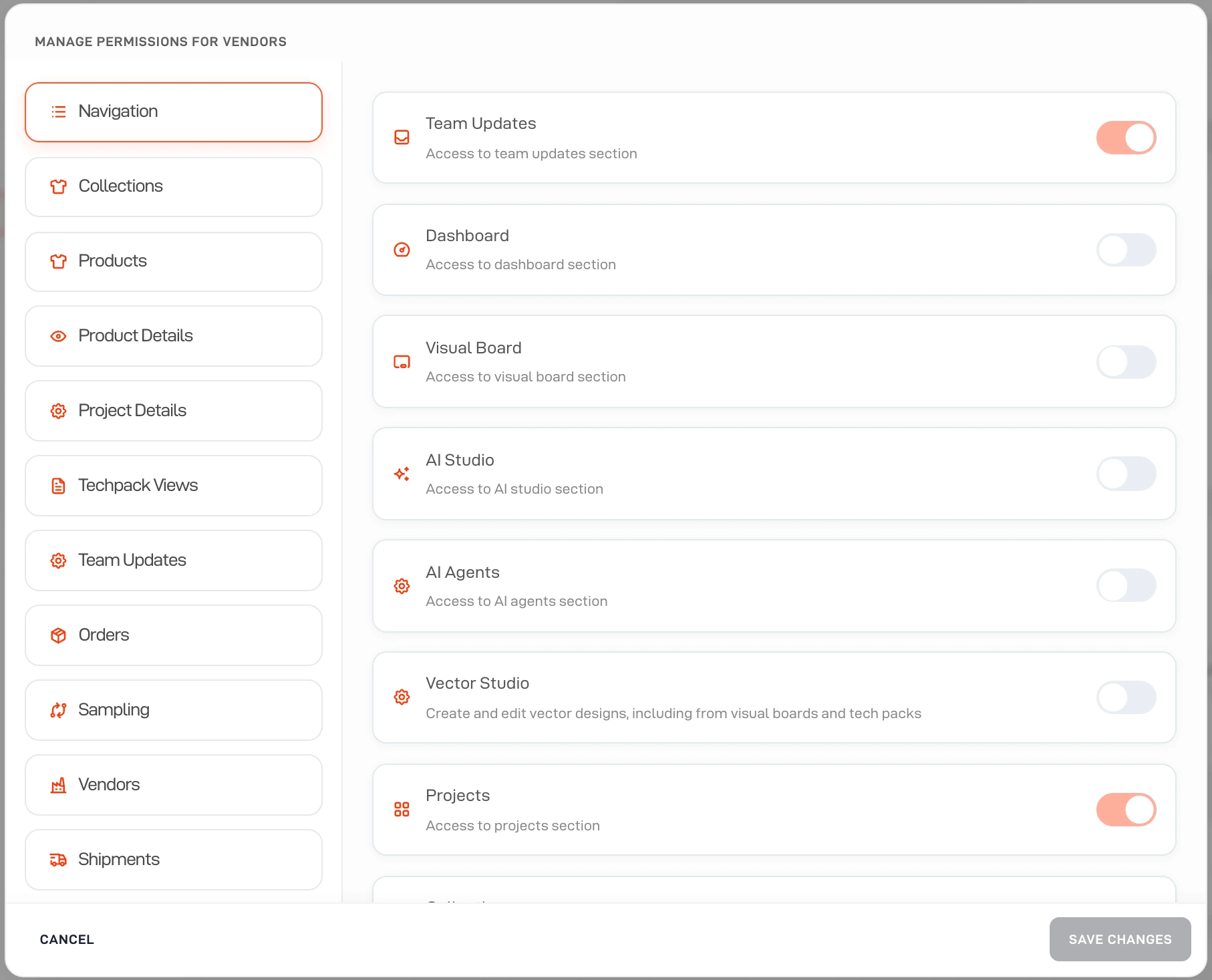
Access should follow the work. A factory making the hoodie does not need unrelated designs or another supplier’s commercial information. Review the product access, visible tabs and shared attachments for the vendor account. Do not assume that adding a contact to the directory is the same as granting access.
Lifecycle has vendor permissions and attachment visibility controls. Review these with the person responsible for your workspace, including any costing information available to vendors. Use the vendor preview where available to check the result from their perspective.
Use AI to help maintain supplier information
Ask AI can find vendor records, create suppliers and update vendor details with approval. It can also help find missing information on products, such as a missing main vendor. That makes it useful for preparing records and finding gaps before you start sharing work.
Keep communication explicit. In the documented workflow, sharing a tech pack still happens through Share Tech Pack; asking the agent about a product does not itself send the factory the approved document. Name the person who is responsible for sending requests and following up.
Review supplier performance using the underlying orders
Track agreed dates, actual responses, sample issues and delivery results. A late sample may reflect a factory delay, a late brand change or missing information in the request. Keep the relevant conversation and dates so your team can distinguish those causes.
Before choosing a tool, test one supplier from first contact through a tech-pack share, sample request and quote. Ask your sourcing colleague to find the outstanding response without searching their inbox. Then check how that supplier’s order and delivery dates appear in production tracking.