


Fashion PLM is product lifecycle management software for developing clothing and other products. It holds the information teams use before and during manufacturing: designs, materials, measurements, sample feedback, costs and factory instructions. A growing brand may need it when that information becomes difficult to maintain across spreadsheets, folders and email.
This guide compares Lifecycle with Lectra Kubix Link, PTC FlexPLM, DeSL and Centric. We build Lifecycle, and our position is clear: a fashion PLM should be easy for the whole team to use and should reduce the manual work around product development. The comparison focuses on those priorities, with links to each provider’s product information.
The product-development tasks to compare
Use a garment your team already understands, such as a zip-up hoodie. Its tech pack is the instruction document for the factory. Its bill of materials, or BOM, lists the fabrics and trims. Its measurement chart gives the dimensions for each size. A sample round records one physical version the factory makes for your review.
The PLM should help these records stay connected. If you change the sleeve length after trying on a sample, the team needs to update the requirement and communicate it to the factory. The supplier should not have to guess whether the email comment or the old PDF is correct.
- Create and revise the tech pack, including drawings, measurements and materials.
- Record sample measurements, annotated photos and the decision for the next round.
- Share the relevant product information with factory contacts and check their access.
- Record costs, responsibilities and dates for the collection.
- Reuse approved templates and show which parts of the work can be automated.
1. Lifecycle PLM
Lifecycle connects product data, tech packs, materials, samples, costing and project work. Consider it when your team wants the garment specification and the work around it in the same place.
A useful trial starts with a product containing a BOM and size chart. Build the vendor tech pack, request a sample, record the measurements and fit feedback, then review what the supplier sees. The sample-management guide explains that sequence. Also test your collection and production-tracking requirements.
Ask us to show the migration and supplier-access steps as well as the product screens. Change of Scenery describes how its lean team moved away from oversized spreadsheets and repeated factory emails. Use that customer example as context, then test your own work.
Lifecycle also offers AI measurement generation and automatic annotations on garment drawings. Points of measure are the named dimensions, such as chest width, that the annotations connect to the chart. Ask AI can create products, load measurement templates and update BOM components, with approval for record changes. The tech-pack guide shows how this differs from assembling each page manually.
Ask to see a complete example: start from the hoodie design, load an approved chart, add a component, review the AI’s proposed changes and open the factory pack. Generated measurement values and beta annotation tools still require review; your team approves the specification.
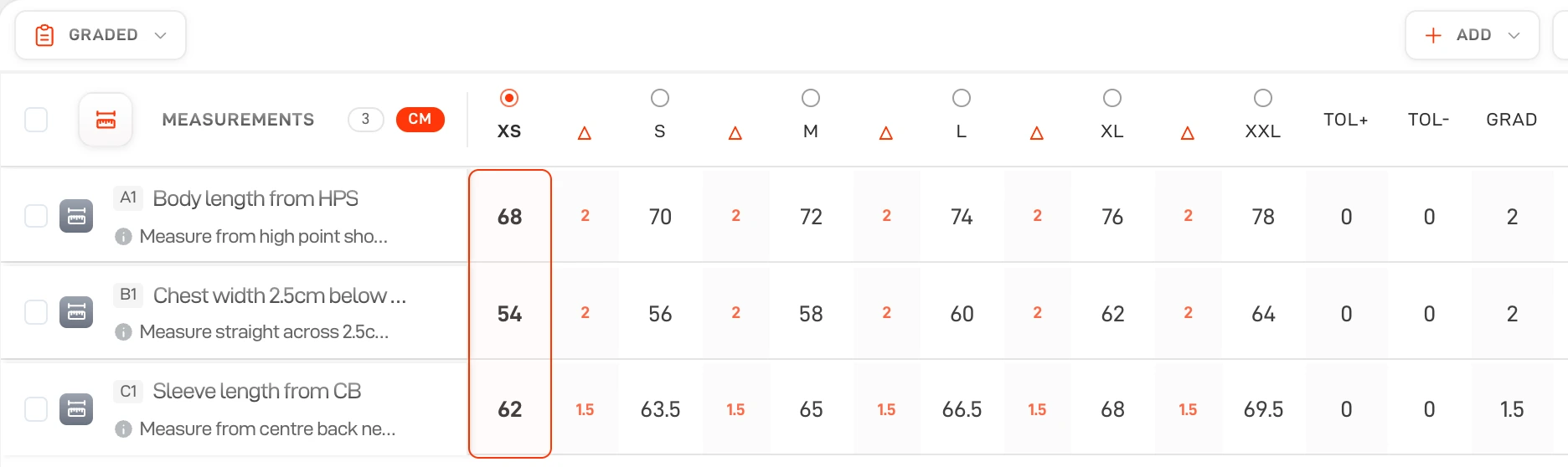
Lifecycle’s modern interface and AI assistance are central to how we approach PLM. The aim is to make the workspace usable by designers, production teams and supplier contacts, so product information is maintained where the work happens. An interface people avoid sends the work back into spreadsheets and email.
AI support spans more than design imagery. Ask AI can help create products, reuse measurement templates, update BOMs and work with sample, task and order records, with approval for changes. That gives a small team a way to carry out parts of product development through instructions, while retaining control of the result. Ask us to demonstrate those tasks with your own product.
2. Lectra Kubix Link
Lectra Kubix Link combines fashion PLM with a configurable approach to collection and product information. Its wider range includes PIM, moodboards and forms. That breadth makes the configuration and actual day-to-day interface worth examining closely.
Ask to see the current product your team would use, with the modules included in your quote. Have a designer change a measurement and a supplier find the revised instruction. Compare the steps and training involved with the same task in Lifecycle; a broad suite is not an advantage if routine work becomes difficult.
3. PTC FlexPLM
PTC FlexPLM serves enterprise retail product development, with customers including large multi-brand organisations. Its enterprise scope makes implementation, administration and the fit for a lean team central buying questions.
Ask for a working session using the proposed configuration, rather than a presentation about global scale. Find out who maintains it after rollout, how much training everyday users need and which AI tasks are available in the quoted version. Compare that effort with the product-development work your brand actually needs.
4. DeSL PLM
DeSL offers fashion PLM and describes options for small and medium businesses. Put it on the shortlist if you want to examine a modular approach and clarify the scope your team would start with.
For DeSL, ask which modules, meaning separately packaged functions, are included in the proposed subscription. Bring your fabric and colour records and ask to build a product using them. Confirm the users, configuration work and training covered by the quote, including what changes when you add another team.
5. Centric PLM
Centric describes product development, sourcing and collection workflows for brands, retailers and manufacturers. Evaluate it when the selection involves several functions and you want to test a broad PLM scope.
For Centric, ask for a rollout sized to your current team. Have the designer and technical developer create and revise the hoodie, then identify who will maintain templates and permissions after setup. Check that the features shown in the demo are included in the proposed package.
Ask each vendor to complete the same garment example
- 1Create a style with two colourways, a real BOM and your size chart.
- 2Share the specification with a supplier and check what they can see.
- 3Receive a sample, record an incorrect measurement and request a correction.
- 4Change a material and review the cost implications.
- 5Find the open task, responsible person and next deadline.
- 6Export the product data and explain how you would leave the system if needed.
The point is to expose copying, missing context and steps your team cannot complete. Keep the supplier-management checklist alongside the demo brief so supplier adoption gets the same attention as internal use.
Compare AI tools by what they actually do
There are several different capabilities behind the term AI: making an image, suggesting text, drafting measurements and carrying out changes to product records. An agent is an assistant that can perform tasks in the software. Ask each provider which of those capabilities it offers and request a demonstration of the task you need.
For example, ask whether it can load your approved measurement template and add a missing point of measure to the product. Then check where you review and approve the change. This gives you a more useful comparison than assuming every AI feature is equivalent, or that every competing system is manual.
Judge the software, not the marketing website
A polished website is not evidence of an easy-to-use PLM. Look past campaign imagery and ask to use the current production interface. This matters particularly when evaluating an established suite: confirm that the screens shown belong to the version and modules you would actually buy.
Have a colleague find a style, change a measurement, request a sample and locate the vendor’s reply. Notice confusing navigation, repeated entry and steps that require an administrator. Ask which features are available now and which are roadmap promises. Branding cannot compensate for a workflow your team struggles to complete.
Compare onboarding, migration and subscription costs
Write down licence fees, migration, training, integrations and internal setup time. Confirm the commercial terms for supplier users and support. Pricing and implementation depend on scope, so request comparable written quotes rather than comparing an entry-level price with a complete rollout.
For migration, agree what happens to product records, BOMs, measurements, files and old approvals. Ask to validate a complete record before the full load. Our migration guide lists the checks a product team should make.
Choose a system the whole team will use
Every brand benefits from a clear, shared system for its product information. Start with the workflows you need today, then expand as the range and team grow. A small team is a reason to prioritise usability and less administration, not to leave specifications and supplier decisions disconnected.
Our recommendation is to evaluate Lifecycle first if those are your priorities. Bring a product and have the people doing the work try the interface, AI tools and supplier sharing. Compare the steps they can complete themselves, the setup required and the total cost. The small-brand guide shows the workflow you can build towards.